Word scramble maker
Type your words. Every word gets its letters mixed up. Try them here, then print the sheet with an answer key.
Free PDF with the answer key. No account. No limit.
Want ready-made sets? Browse themed word scrambles.
How to use the word scramble maker
- Type up to 30 words. Press Enter after each one, or paste your list. Each word can have up to 12 letters.
- Add a title if you like, then choose Make the sheet. Every word appears on the page with its letters mixed up.
- Type an answer or two to try the sheet. Hint shows the first letter of a word. Then choose Print or download the PDF. It opens in a new tab with the answer key at the end.
What's in the PDF
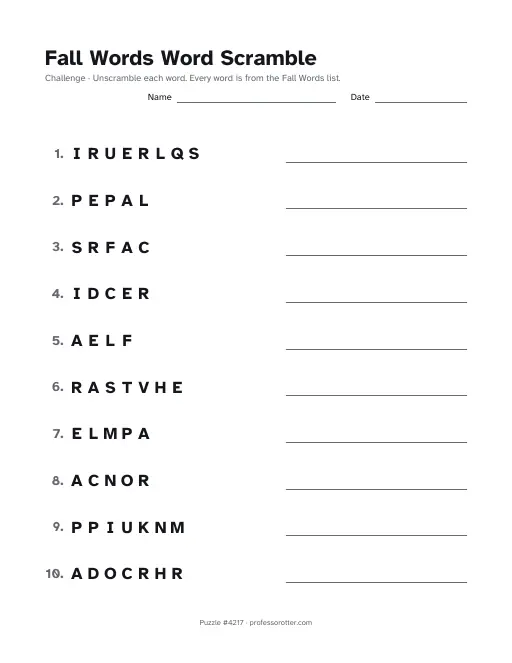
- Worksheet pages with 10 numbered rows each. A longer list runs onto more pages, and the numbers carry on from one page to the next.
- Big mixed-up letters in every row, with a line beside them for the child to write the word.
- Your title with Word Scramble after it, lines for a name and the date, and a note that every word comes from your list. The note starts with Easy when the words are short and Challenge once a longer word is on the list.
- A footer on every page with the puzzle number and professorotter.com.
- Answer pages after all the worksheet pages, with each word written on its line.
Questions about the word scramble maker
Is the word scramble maker free?
Yes. Make as many sheets as you need, print them and download the PDFs for free. There's no cap on how many you make.
Do I need an account?
No. Nothing asks you to sign up or log in, and you never type an email address.
Is there a watermark?
No. A short footer line on each page shows the puzzle number and professorotter.com, and that's all.
How many words can I put on one sheet?
Up to 30 words, each with up to 12 letters. A page holds 10 rows, so a full list prints on 3 worksheet pages. Even 1 word makes a sheet. A repeated word appears only once.
Can I use phrases or words with accents?
Yes. A phrase like ice cream keeps its space in the answer, while the scrambled letters print as one run. Accents are dropped, so café becomes CAFE. Hyphens and apostrophes are fine. Numbers and other symbols get a note asking you to change the word. A word also needs at least 2 different letters, so a word like AAA can't be scrambled.
Are the words in the order I typed them?
No. The maker shuffles the order of the words as well as their letters, so the first word on your list may end up in row 7. Every word comes out mixed up, never in its own spelling.
Can I print the same sheet again later?
Yes. Copy link saves the page address, which holds your words and the sheet number, so the link prints the same sheet every time. Choose New layout to mix up the same words a new way. The title can be up to 80 characters.
Is there an answer key, and what paper size is it?
Yes. The answer pages print after the worksheets, so you can hand out the sheets and keep the answers. Untick Answer key page to leave them off. The PDF is US Letter, 8.5 by 11 inches, portrait. On A4 paper, choose Fit to page in the print dialog.