Handwriting sheets
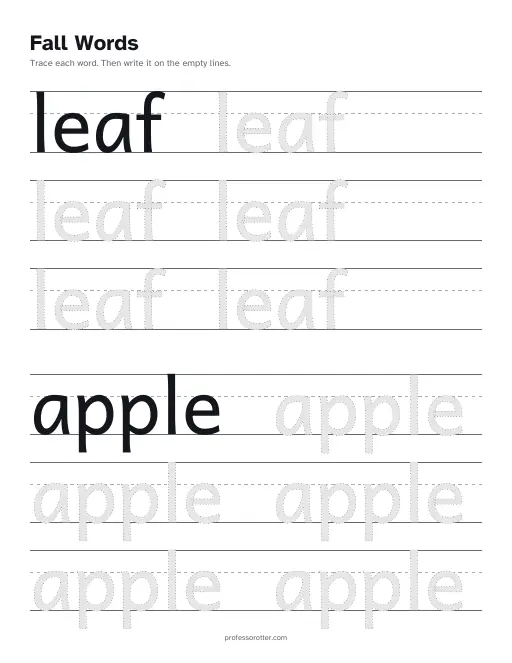
Pick the alphabet, a run of numbers, your own word list or a sentence. Each sheet has a model to copy, gray letters to trace, and empty lines to write on, all on three-line handwriting guides.
Easy prints 1 inch letters for Pre-K and K. Challenge prints ¾ inch letters for K and 1st grade. Expert prints ½ inch letters for 1st and 2nd grade. Cursive sheets use joined letters for 2nd and 3rd grade.
How to use the handwriting sheets
- Choose what to trace: Letters, Numbers, Words or Sentence. Letters gives the whole alphabet in uppercase, lowercase or both. Numbers runs From one number To another, anywhere from 0 to 100. Words takes your own list, and Sentence takes one line of text.
- Pick Print or Cursive under Style, then a Level. Add a sheet title if you like, such as the week of your spelling list, then choose Make the sheets.
- Choose Print or download the PDF. It opens in a new tab, where you can print it or save it. Copy link keeps your choices so you can make the same sheets again.
What's in the PDF
- Letters and numbers get a page each: 26 pages for the alphabet, or one page for every number in your range.
- Words share a page, each on its own set of rows, and a long list runs onto the next page. A single word or a short sentence fills a whole page with practice rows. A long sentence wraps at its spaces.
- Three-line handwriting guides on every row: a solid top line, a dashed middle line and a solid baseline.
- A first row that shows the model in solid ink. When the line has room, gray dotted copies of the word or letter follow it. A word too wide for the line shrinks to fit.
- Practice rows set by the level. Easy is mostly tracing. Challenge mixes lighter tracing with empty lines. Expert leaves every row after the model empty, so the child writes on their own.
- A heading on each page that says what to do, such as Trace the letter B. A title you type takes its place. The grade and the level never print on the sheet.
- A small professorotter.com line at the bottom of each page.
Questions about the handwriting sheets
Is the handwriting worksheet maker free?
Yes. Making the sheets and printing or downloading the PDF are free, with no account and no sign-in. There is no watermark, only a small professorotter.com line at the bottom of each page.
How many words can I put on a sheet?
Up to 30 words, each up to 30 characters. A sentence can be up to 120 characters, and a number range can cover up to 30 numbers. Words print with the spelling and capitals you type, and a word you list twice prints twice.
Can I paste my spelling list?
Yes. Choose Words, then paste the list with one word per line or with commas between them. Each word gets its own box, and you can fix or delete any of them before you make the sheets. A sheet title can be up to 60 characters.
Which level should I pick?
Easy suits Pre-K and K, with letters up to 1 inch tall. Challenge suits K and 1st grade, with letters up to ¾ inch. Expert suits 1st and 2nd grade, with letters up to ½ inch and the most room to write alone.
Can I make cursive sheets?
Yes. Pick Cursive under Style for joined letters, which suit 2nd and 3rd grade. Cursive works with letters, numbers, words and sentences, at any level.
Which characters can I use?
Words can use letters, numbers, spaces, hyphens and apostrophes. A sentence can also use commas, periods, question marks, exclamation marks and colons. Accented letters such as é and ñ print in both styles. If a character can't print, the form quotes the word or sentence that has it so you can fix it.
What paper size are the sheets?
US Letter, 8.5 by 11 inches, portrait. The writing rows stay inside the area that both Letter and A4 printers reach, so A4 paper works too.
Is there an answer key, and can I print the same sheets again?
There is no answer key, since tracing has nothing to mark. Copy link saves your choices in the page address. Nothing on the sheets is random, so the link makes the same pages every time.