Skip-count dot-to-dot
Pick a picture and a number to count by. The dots read 5, 10, 15 and on, so a child practices skip counting to find the picture. The second page shows the finished picture.
Want the 1, 2, 3 kind? Browse dot-to-dot pictures.
How to use the skip-count dot-to-dot
- Pick a picture. The list groups the pictures by level and shows how many dots each one has, and a small preview appears beside it.
- Choose Count by, from 2s, 3s, 4s, 5s or 10s, and a Start at number from 0 to 100. Start at follows the count unless you change it, so counting by 10s reads 10, 20, 30. Then choose Make the sheet.
- Check the line under Your sheet is ready, which gives the first and last number. Choose Print or download the PDF, or untick Answer key page first to print the puzzle alone.
What's in the PDF
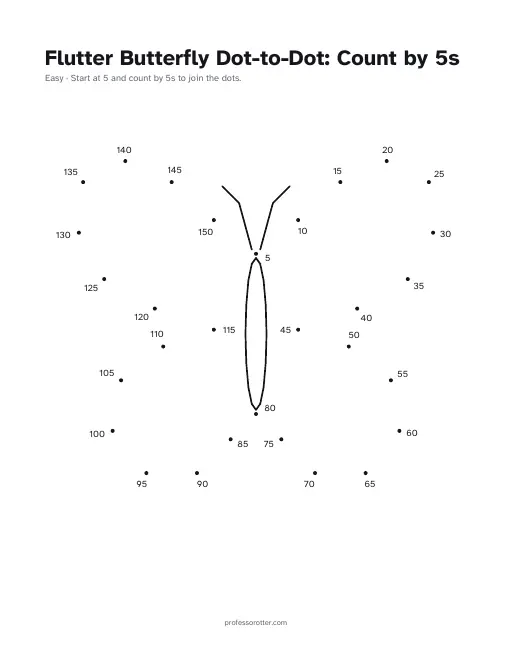
- Page 1: the dot-to-dot, titled with the picture and the count, such as Flutter Butterfly Dot-to-Dot: Count by 5s.
- A line under the title with the picture's level and where to start, such as Start at 5 and count by 5s to join the dots.
- A skip-count number beside every dot, so the child finds the picture by counting on in steps. Most pictures have a few lines drawn in already, such as the butterfly's body.
- Page 2: the finished picture with every dot joined, for checking the work. Untick Answer key page to leave it off.
- A small professorotter.com line at the bottom of each page.
Questions about the skip-count dot-to-dot
Is the skip-count dot-to-dot maker free?
Yes. Making the sheet and printing or downloading the PDF are free, with no account and no sign-in. There is no watermark, only a small professorotter.com line at the bottom of each page.
Which numbers can I count by?
By 2s, 3s, 4s, 5s or 10s. The form starts on 5s. Start at can be any whole number from 0 to 100, so starting at 3 and counting by 5s gives 3, 8, 13 and on. Leave Start at blank to start at the count itself.
How many pictures are there?
39 in all: 13 Easy pictures with 18 to 30 dots, 11 Challenge pictures with 38 to 61 dots, and 15 Expert pictures with 80 to 83 dots. Pictures with more dots run to bigger numbers.
How high do the numbers go?
It depends on the picture, the count and the start. The line under Your sheet is ready shows the last number before you print. The Flutter Butterfly, counting by 5s from 5, runs from 5 to 150.
Is there an answer key?
Yes. Page 2 shows the finished picture with every dot joined. Answer key page is ticked to start; untick it before you choose Print or download the PDF to get the puzzle page alone.
Can I share the sheet or print it again?
Yes. Copy link saves the picture, the count and the start number in the page address. Nothing on the sheet is random, so the link prints the same page every time.
What paper size is the sheet?
US Letter, 8.5 by 11 inches, portrait. On A4 paper, choose Fit to page in the print dialog so nothing is cut off.
Can I make a dot-to-dot that counts by 1s?
Not with this maker, which counts by 2s and up. The dot-to-dot pictures on the site already number their dots 1, 2, 3 in order, and you can print those as they are.