Secret code maker
Type a short message and pick a level. Easy swaps each letter for a picture, Challenge swaps it for another letter, and Expert hides the key. Print it with the key and the answer.
Want ready-made codes? Browse jokes, riddles and facts in code.
How to use the secret code maker
- Type a short message, up to 110 characters. A counter under the box keeps track as you type. Use letters, spaces and simple punctuation.
- Pick a level: Easy picture code, Challenge secret code or Expert cryptogram. Then choose Make the code.
- Try cracking it on screen, then choose Print or download the PDF. It opens in a new tab with the code sheet and an answer page.
What's in the PDF
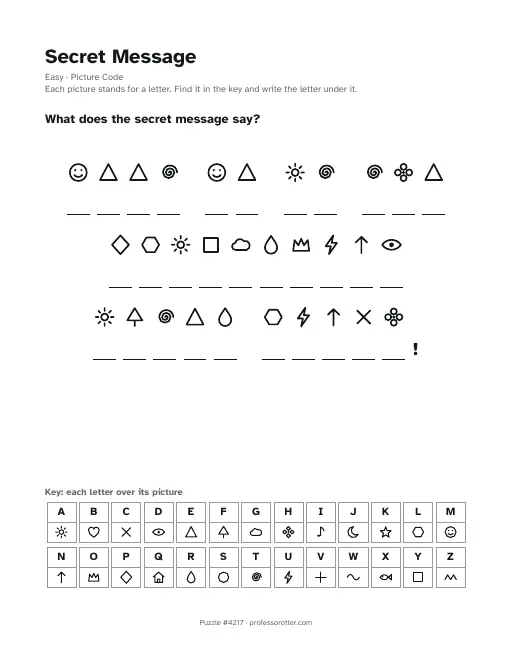
- A Secret Message page with the level and how to solve it, the question What does the secret message say?, and your message in code with a blank under every letter.
- Punctuation such as ! and ? printed as it is, so kids can see where sentences end.
- A key along the bottom with all 26 letters. On Expert the key lists the code letters with blanks under them, apart from the hint letters, for kids to fill in as they crack the code.
- A footer with the puzzle number and professorotter.com.
- An answer page with every letter written under its code, the whole message spelled out and the full key.
Questions about the secret code maker
Is the secret code maker free?
Yes. Make a code, print it and download the PDF for free, as many times as you like. There's no account and no email address to enter.
Is there a watermark?
No. A thin footer line at the bottom shows the puzzle number and professorotter.com. Nothing covers the code or the key.
How long can my message be?
Up to 110 characters, counting spaces, so the code and the key fit on one page. Each word can have up to 11 letters, plus one mark like ! or a comma. Longer words get a note asking you to shorten them.
What can I type in the message?
Letters, spaces and the marks . , ! ? ' and -. Spell numbers as words, so write TEN instead of 10. Accents are dropped, so é prints as E. The message prints in capital letters.
What do the three levels do?
Easy swaps each letter for a small picture, like a star or a heart, and prints the key. Challenge swaps each letter for a different letter and prints the key too. No letter ever stands for itself. Expert is a cryptogram. It works like Challenge, but the key is left for kids to fill in, with a few of the message's most common letters given as hints.
Can I print the same code again later?
Yes. The page address holds your message, the level and the code number, so Copy link saves the exact code. Opening that link prints the same sheet. Choose New code to scramble the same message a different way.
Is there an answer key?
Yes. The second page shows each decoded letter under its code, then the whole message written out, then the full key. To print only the code sheet, untick Answer key page before you open the PDF.
What paper size is the PDF?
US Letter, 8.5 by 11 inches, in portrait. On A4 paper, pick Fit to page in the print dialog so the key at the bottom isn't cut off.