Name coloring page
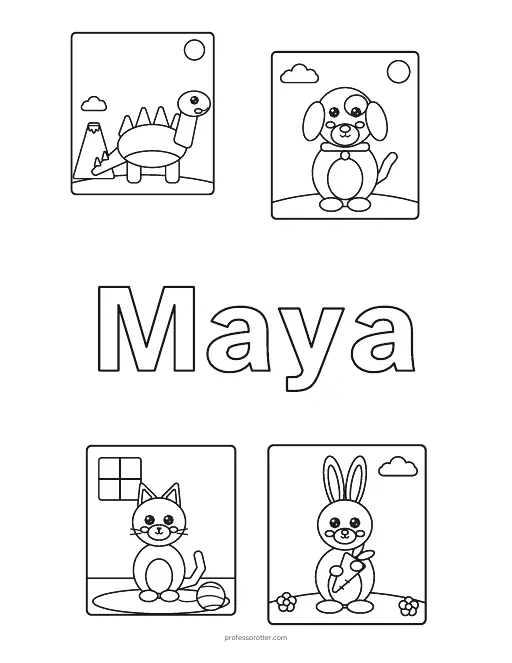
Type a child's first name and pick a theme. The page prints the name in big outlined letters with pictures around it, ready to color.
Want a picture without a name? Browse coloring pages.
How to use the name coloring page
- Type the child's first name. It can have up to 12 letters, plus spaces, hyphens and apostrophes.
- Pick a theme for the pictures. The form starts on Animals. Then choose Make the page.
- The name shows as a heading with three buttons. Print or download the PDF opens the page in a new tab. Copy link saves it. New layout moves the pictures around and can swap in others from the same theme.
What's in the PDF
- One US Letter page in black and white, ready for crayons, markers or colored pencils.
- The name across the middle of the page in big outlined letters, with room inside each letter to color.
- Four line drawings from your theme, two above the name and two below. Themes with fewer than four pictures repeat some of them.
- A long name prints smaller. A name with a space or a hyphen can split onto two lines when that makes the letters bigger.
- A small professorotter.com line at the bottom of the page.
Questions about the name coloring page
Is the name coloring page maker free?
Yes. Making the page and printing or downloading the PDF are free, with no account and no sign-in. There is no watermark, only a small professorotter.com line at the bottom of the page.
Which themes can I pick?
Animals, Ocean, Space, Vehicles, Sweet treats, Nature, Halloween, Thanksgiving and Christmas. The seasonal themes have the most pictures to draw from, so New layout gives them the most variety.
Which names work?
First names up to 12 letters, with spaces, hyphens and apostrophes. Accented letters such as é, ñ and ü print as you type them. A name too wide to print big enough to color asks for a shorter name or a nickname.
Can I make pages for a whole class?
This page takes one name at a time, so make a page, print it, then type the next name. For a class list in one go, use the name activity book. It takes up to 40 names and gives each child a book with a name coloring page like this one inside.
Can I get a different layout?
Yes. New layout keeps the name and theme and draws a fresh arrangement of the pictures. Choosing Make the page again with the same name and theme keeps the layout you have, so a second click doesn't move anything.
Can I print the same page again later?
Yes. Copy link saves the name, the theme and the layout number in the page address, and that link always makes the same page. The first name is part of the link, so share it only with people who should see it.
What paper size is the page?
US Letter, 8.5 by 11 inches, portrait. On A4 paper, choose Fit to page in the print dialog so nothing is cut off.
Is there an answer key?
No. A coloring page has nothing to check, so the PDF is just the one page. Children can color the letters, the pictures and the space around them however they like.