Name activity book
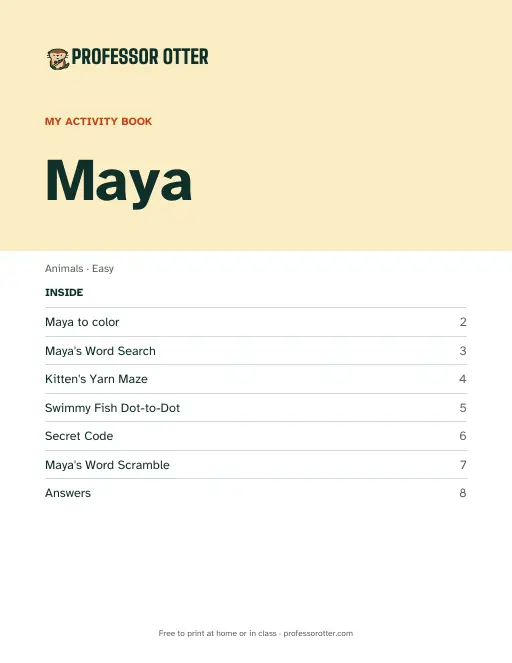
Type a name, or paste a whole class list. Each child gets an 8-page book with their name on the cover: a name coloring page, a word search with the name hidden, a maze, a dot-to-dot, a secret code, a scramble, and the answers.
How to use the name activity book
- Type a child's name, or paste a class list with one name per line or commas between them. Up to 40 names, each up to 12 letters.
- Pick a theme and a level. The theme picks the pictures, the maze and the puzzle words, and the level sets how hard the puzzles are. Then choose Make the books.
- Choose Print or download the PDF. Every child's 8-page book is in the one file, one after another. Copy link saves the set, and New layout shuffles fresh puzzles for every book.
What's in the PDF
- Page 1: a cover that reads My Activity Book, with the child's name in large letters, the theme and level, and a list of what is inside.
- Page 2: a name coloring page, with the name in big outlined letters and theme pictures around it.
- Page 3: a word search with the child's name hidden among theme words. On Easy, words run left to right, top to bottom or diagonally down. On Challenge and Expert they can also run backwards and up.
- Page 4: a themed maze from a start picture to a finish picture.
- Page 5: a dot-to-dot picture numbered from 1, with more dots at higher levels.
- Page 6: a secret code that spells THIS BOOK BELONGS TO and then the child's name. Easy uses a picture code, Challenge a letter code with its key, and Expert a cryptogram with a few hints and no key.
- Page 7: a word scramble of theme words. When the name can be scrambled, it is one of them.
- Page 8: the answers to the word search, maze, secret code and scramble, each shrunk to a quarter of the page. A finished dot-to-dot shows itself, so it has no answer.
Questions about the name activity book
Is the name activity book free?
Yes. Making the books and printing or downloading the PDF are free, with no account and no sign-in. There is no watermark. The cover carries the Professor Otter logo, and the pages carry a small footer with a puzzle number, professorotter.com or both.
Can I use a class list?
Yes. Paste up to 40 names at once. Each child gets their own 8-page book, and the PDF holds them all, so a class of 20 prints as one 160-page file. Two children with the same name still get different puzzles.
Which names work?
Names up to 12 letters, with spaces, hyphens and apostrophes. Accented letters print as typed on the cover and the coloring page. The word search, scramble and secret code use plain capitals, so Zoë becomes ZOE.
What does the level change?
Higher levels hide more words in the word search, let them run in more directions, and give a harder maze and a dot-to-dot with more dots. The secret code goes from a picture code on Easy to a cryptogram on Expert.
Is there an answer key?
Yes. Page 8 of each book holds the answers to the word search, maze, secret code and scramble. Pull it out before you hand the book over if you want the child to work without it.
Can I print the same books again later?
Yes. Copy link saves the names, the theme, the level and the layout number, and that link always makes the same books. If you fix a misspelled name and choose Make the books again, the layout number stays the same. The names are part of the link, so share it only with people who should see them.
What paper size are the books?
US Letter, 8.5 by 11 inches, portrait. On A4 paper, choose Fit to page in the print dialog so nothing is cut off.
Do I need a color printer?
No. The puzzles are black line art. The cover band, the maze's start and finish pictures and the marked answers use some color, and a black and white printer prints those in gray.