Flashcard maker
Make math fact cards from any number range, with the answer on the back of each card. Or type your own words, such as this week's spelling list, for one-sided word cards.
Want a ready-made deck? Browse math flashcards.
How to use the flashcard maker
- Under Cards for, choose Math facts or Words. For math, pick the operation and the smallest and largest numbers. For words, press Enter after each word or paste your whole list.
- Add a title if you like. For math cards, choose a print style, and tick Shuffle the cards to mix up the order. Then choose Make the cards.
- Check the first cards and the page count on screen, then choose Print or download the PDF. Cut on the dashed lines.
What's in the PDF
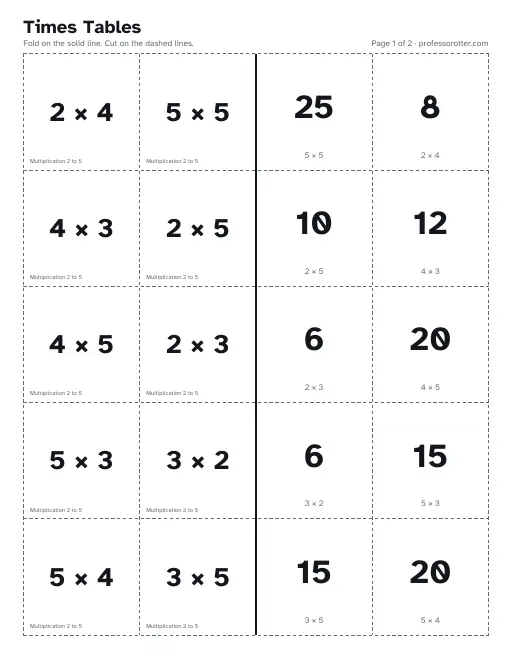
- Fold-over math pages: up to ten cards a page, with the problems on the left half and the answers on the right. Fold on the solid line so each answer sits behind its problem, then cut.
- Two-sided math pages: up to twenty problems on one page, then an answer page to print on the back. Flip on the long edge.
- On every answer side, the answer prints large with the problem small underneath, so a stray card is easy to check.
- Word cards: up to ten wide cards a page, printed on one side only.
- A header on each page with your title, how to fold or cut, and the page number with professorotter.com. Each card front carries a small tag in its corner: the operation and range on math cards, or the deck title on word cards.
Questions about the flashcard maker
Is the flashcard maker free?
Yes. Build as many decks as you need, and print or download each one at no cost.
Do I need an account?
No. The cards are one form away, with no sign-in and no email address to give.
Is there a watermark?
No. The top of each page shows the page number and professorotter.com, and each card has a small tag naming its deck. Nothing prints across the cards.
How many cards can I make?
For math cards, pick a smallest and largest number from 0 to 20. Every pair of numbers in your range becomes one card, up to 100 cards, so addition from 0 to 9 makes 100. A word deck holds up to 60 words of 20 letters or fewer.
Where do the answers go?
On the back of each math card. Fold-over cards work on any printer: fold the page on the solid line so each answer lands behind its problem, then cut. Two-sided cards put the answers on their own page for a printer that prints both sides. Word cards have no back.
Can I paste my spelling list?
Yes. Choose Words under Cards for, then paste the list. Each new line or comma starts a new card. Accents print as you type them, so café stays café. Each word prints large on one side, for you to say aloud or for your child to read.
Can I print the same deck again later?
Yes. The page address updates to hold your deck, so bookmark it or send it to print the same cards again. Without Shuffle the cards, math cards always print in the same order. With it ticked, the address also keeps that shuffle, and Shuffle again deals a new order.
What paper size are the cards?
The pages are US Letter, 8.5 by 11 inches, in portrait. The cards stay inside the area an A4 page can print, so they also fit A4 paper at 100% size.