Color by math maker
Pick an operation, the numbers your child is practicing this week and a picture. Every square gets a problem from those facts, and each crayon in the key has its own answer. Print it with an answer key.
Want a ready-made sheet? Browse color by math pictures by level.
How to use the color by math maker
- Pick an operation, then tap the numbers your child is practicing, from 0 to 9. Each number brings its facts with 1 to 9, both ways round.
- Choose one of the 54 pictures. The list shows how many colors each one uses. Then choose Make the sheet.
- Try it on screen first: tap a crayon in the key, then tap every square whose answer matches it. When it looks right, choose Print or download the PDF.
What's in the PDF
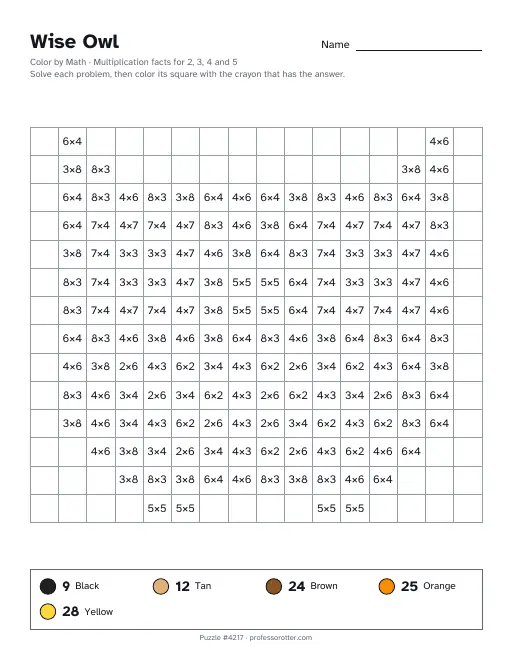
- Page 1, the puzzle: the picture's name with a Name line, a line naming the facts it practices, and the instructions.
- A grid with one problem in every square that gets colored. Depending on the picture, that is 67 to 192 problems.
- A crayon key at the bottom. Each crayon has its own answer number, so your child solves a square and colors it with the crayon that matches.
- Page 2, the answer key: every square filled in with its color and its answer, with the same crayon key below.
- A small footer on both pages with the puzzle number and professorotter.com.
Questions about the color by math maker
Is the color by math maker free?
Yes. There is no charge to make a sheet, print it or save the PDF, and no cap on how many you make.
Do I need an account?
No. You pick the facts and a picture, and the sheet is ready. There is no login and no email sign-up.
Is there a watermark?
No. Only a tiny line at the foot of each page, with the puzzle number and professorotter.com, marks the sheet.
Which facts can I practice?
Addition, subtraction, multiplication or division, with any mix of the numbers 0 to 9. Pick 7 alone for the 7 times table, or 6, 7 and 8 for a mixed review. Every problem on the sheet comes from the numbers you picked.
Why does it ask me to pick more numbers?
Each color in the picture needs its own answer. If your facts give fewer different answers than the picture has colors, the form tells you how many it needs. Add another number, or choose a picture with fewer colors. The pictures use 2 to 7 colors.
Is there an answer key?
Yes. Page 2 shows every square in its color with its answer printed on it, so you can check a finished picture at a glance. To print the puzzle on its own, clear the Answer key page box next to the PDF button first.
Can I print the same sheet again later?
Yes. The page address holds the operation, your numbers, the picture and the sheet number, so Copy link saves this exact sheet. Anyone who opens that link gets the same sheet back, ready to print. Choose New problems to deal fresh problems onto the same picture.
What paper size is the sheet?
It prints on US Letter paper, 8.5 by 11 inches, upright. If your printer takes A4, pick Fit to page when you print so the crayon key at the bottom stays on the page.